Files related to solving the challenge are in their respective folders
The Beginning -> step1
Repair service -> step2
Decryption in progress -> step3
Please open issue should you have any questions. It will be added to the respective Q&A section.
Author: S051_Destroy Lai Lai's Machine (aka DLLM)
OS: I love repairing files
Situation
Digital Instrumentality Project
Episode 26 of Evangelion... but for computers! Files are losing their 'ego' and turning into LCL of 1s and 0s. All hope is not yet lost because the files are still separated by 'buffers' of 00s. Restore 'ego' of 3 files and 'carve' them out.
Author: Karma
Flag Format: PUCTF25{[a-zA-Z0-9_]+_[a-fA-F0-9]{32}}
Hint:
- My favorite color is green 2. Open the document for some hints
Attachments:
Fanta_file_new
(Stored at step1/Fanta_file_new)
The Beginning
The first thing we see is a file called Fanta_file_new.
We know that it contains at least 3 files, because the challenge asked us to Restore 'ego' of *3* files and 'carve' them out.
Identifying the Files
first, let's view its content in hex editor (I use hex editor in vscode).
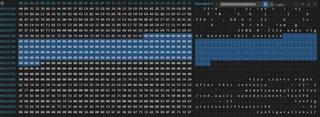
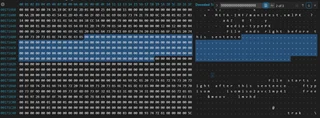
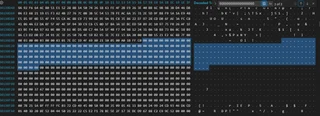 After searching for a large pad of 00s (
files are still separated by 'buffers' of 00s in challenge desc), we found 3 matches, 2 of them is interesting.
They got "File ends right before this sentence" and "File starts right after this sentence" right next to the pads,
which is quite obvious that we have 3 files in this big thingy.
Extracting the Files
By using a simple python program (cause python is fast to write):
with open("Fanta_file_new", "rb") as f:
  cont = f.read()

padded = cont.split(b"File starts right after this sentence")
not_padded = []
for n in padded:
  not_padded.append(n.split(b"File ends right before this sentence")[0])

for n in range(3):
  with open("Fanta"+str(n), "wb") as f:
    f.write(not_padded[n])
we can extract the 3 files' content as Fanta0, Fanta1 and Fanta2
The Beginning - checkpoint Q&A
Q - Why not use the NUL padding as the split?
A - Because I found out the amount of NUL pads are not consistent, and copying and pasting a text is easier than typing a bunch of \00
Q - Why Fanta{n}?
A - Because I dont want to waste time onto naming, the init file is a Fanta_file so I just Fanta it all the way
Repair service
whenever I encounter file with unknown type, I always do a binwalk first
admin@XXXX:/mnt/c/Users/XXXX/DIP/step2$ binwalk *

Scan Time:     2025-04-20 21:20:03
Target File:   /mnt/c/Users/XXXX/DIP/step2/Fanta0
MD5 Checksum:  5511009f2ecd4d075beb4be27cafc969
Signatures:    411

DECIMAL       HEXADECIMAL     DESCRIPTION
--------------------------------------------------------------------------------


Scan Time:     2025-04-20 21:20:03
Target File:   /mnt/c/Users/XXXX/DIP/step2/Fanta1
MD5 Checksum:  af3b27fa39169f96675c610ebd59e75e
Signatures:    411

DECIMAL       HEXADECIMAL     DESCRIPTION
--------------------------------------------------------------------------------
73            0x49            Zip archive data, at least v2.0 to extract, name: Configurations2/floater/
127           0x7F            Zip archive data, at least v2.0 to extract, name: Configurations2/statusbar/
183           0xB7            Zip archive data, at least v2.0 to extract, name: Configurations2/toolbar/
237           0xED            Zip archive data, at least v2.0 to extract, name: Configurations2/menubar/
291           0x123           Zip archive data, at least v2.0 to extract, name: Configurations2/popupmenu/
347           0x15B           Zip archive data, at least v2.0 to extract, name: Configurations2/progressbar/
405           0x195           Zip archive data, at least v2.0 to extract, name: Configurations2/accelerator/
463           0x1CF           Zip archive data, at least v2.0 to extract, name: Configurations2/toolpanel/
519           0x207           Zip archive data, at least v2.0 to extract, name: Configurations2/images/Bitmaps/
580           0x244           Zip archive data, at least v2.0 to extract, compressed size: 2424, uncompressed size: 13193, name: styles.xml
3044          0xBE4           Zip archive data, at least v2.0 to extract, compressed size: 261, uncompressed size: 899, name: manifest.rdf
3347          0xD13           Zip archive data, at least v2.0 to extract, compressed size: 1087, uncompressed size: 4780, name: content.xml
4475          0x117B          Zip archive data, at least v2.0 to extract, compressed size: 451, uncompressed size: 976, name: meta.xml
4964          0x1364          Zip archive data, at least v2.0 to extract, compressed size: 2034, uncompressed size: 14534, name: settings.xml
7040          0x1B80          Zip archive data, at least v2.0 to extract, compressed size: 4080, uncompressed size: 4080, name: Thumbnails/thumbnail.png
11174         0x2BA6          Zip archive data, at least v2.0 to extract, compressed size: 301, uncompressed size: 1061, name: META-INF/manifest.xml
11526         0x2D06          Zip archive data, at least v2.0 to extract, compressed size: 84, uncompressed size: 121, name: media-type
12831         0x321F          End of Zip archive, footer length: 22


Scan Time:     2025-04-20 21:20:03
Target File:   /mnt/c/Users/XXXX/DIP/step2/Fanta2
MD5 Checksum:  aac32d6f73d92be923d7190092f320d9
Signatures:    411

DECIMAL       HEXADECIMAL     DESCRIPTION
--------------------------------------------------------------------------------
well, it seems that Fanta1 is a zip file, we can rename it to Fanta1.zip first
how about the rest?
Fanta0
opening it in hex editor, we can see IHDR. What is that?
searching IHDR online, we can see the first few results are related to PNG.
(btw IHDR is a chunk that contains the image information such as width, height, size of color byte, color type, compression, filter and enlacement method)
we can double check that by going to the end of the file, where lies 0000000049454e44ae426082, a classic PNG file suffix
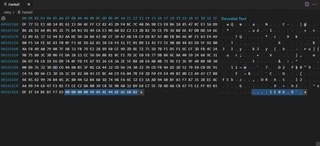
but Fanta0.png seemed to have its header missing
by going to libpng.org [external], we can see the head of a PNG is 89 50 4E 47 0D 0A 1A 0A {4 bytes} 49 48 44 52
what is 49 48 44 52? IHDR! we know where it is!
now we know what bytes are missing, and we can repair it.
don't forget to add a .png extension to Fanta0
Fanta1
things are much easier when you already know its a .zip file
hmm, where is the PK\x03\x04 signature of the zip? Lets add it in, it's now fixed
Fanta2
let's hex it too
is there anything familiar?
avc1mp4 from 0x18 to 0x1E
which means it is a mp4 with avc1 encodings
lets add the .mp4 extension to it first...
wait it's already fixed? wow
Repair service - checkpoint Q&A
Q - how do you know the only thing missing in Fanta1.zip is PK\x03\x04?
A - you can see more PK\x03\x04\x14\x00\x00\x08\x00\x00\x3D\80 chunks below.
By cross referencing (always has been) you can see the only missing is PK\x03\x04 (the header)
where the mininum version needed to extract (\x14\x00),
general purpose bit flag (\x00\x00),
compression method (\x08\x00),
etc are all intact
Decryption in progress
now we have repaired all the Fantas, lets hunt!
Fanta0.png
whenever steganography gets into images, exiftool, steghide and zsteg are tools that get instantly tried out first
look what do we have here in zsteg
b1,r,lsb,xy .. text: "]{\"hasText\":true,\"hasFile\":false,\"encrypted\":\"\",\"dataLength\":37,\"channels\":[\"G\"],\"bitDepth\":1}"
b1,r,msb,xy .. text: "&D\\DD4D&"
b1,g,lsb,xy .. text: "!PUCTF25{1st_Rule_of_fite_club_is_"
b1,rgba,lsb,xy .. file: RDI Acoustic Doppler Current Profiler (ADCP)
b3,bgr,lsb,xy .. text: ")'m%mIR`"
b4,r,lsb,xy .. text: "$0\"4@5T|!1I"
b4,g,lsb,xy .. text: "%13%Q5El 0H"
b4,b,lsb,xy .. text: "%13%Q5El 0H"
b4,rgb,lsb,xy .. text: "#232$UEP"
b4,bgr,lsb,xy .. text: "3#2\"5TUA"
b4,rgba,lsb,xy .. text: "#?#?2/E_E_"
now we have the first part of the flag
PUCTF25{1st_Rule_of_fite_club_is_
Fanta1.zip
unzip it first before anything
structure:
Fanta1
│   content.xml
│   manifest.rdf
│   media-type
│   meta.xml
│   mimetype
│   settings.xml
│   styles.xml
│
├───Configurations2
│   ├───accelerator
│   ├───floater
│   ├───images
│   │   └───Bitmaps
│   ├───menubar
│   ├───popupmenu
│   ├───progressbar
│   ├───statusbar
│   ├───toolbar
│   └───toolpanel
├───META-INF
│       manifest.xml
│
└───Thumbnails
        thumbnail.png
we can see Configuration2 folder contains nothing, ignore
we can not see anything interesting in manifest.xml, manifest.rdf, meta.xml, mimetype, settings.xml, and styles.xml
we do see some hints in content.xml
...
<office:text>
...
<text:p text:style-name="P1">2 truths 1 lie</text:p>
<text:p text:style-name="P1"/>
<text:p text:style-name="P1"/>
<text:p text:style-name="P2">The encrypted flag is in here somewhere</text:p>
<text:p text:style-name="P2"/>
<text:p text:style-name="P2">
It’s
<text:span text:style-name="T1">only</text:span>
encrypted with base64
<text:span text:style-name="T2">and definitely not XOR</text:span>
</text:p>
<text:p text:style-name="P2"/>
<text:p text:style-name="P3">It hurts when I pee</text:p>
</office:text>
...
we dont even need to spend time assembling the structure, as we can see the rendered version (low quality) in thumbnail.png
A bit off topic
--- START OFF TOPIC ---

2 truth 1 lie

The encrypted flag is in here somewhere
flag only encrypted with base64 and not XOR encrypted
it hurts when Karma pees

if the encrypted flag isn't here
the next one doesn't make sense
therefore not true

if flag is not only encrypted with base64 and with XOR too
its in here somewhere
and karma hurts when bro pee
maybe true

if karma didn't hurt when bro pee
flag is here somewhere
and only encrypted with base64 and not XOR
deeper into decryption you know this is false

so karma hurts when bro pee

---END OFF TOPIC---
now the actual content btw
magic is inside media-type
09f09W09Z09W09Z09009x09/09T09H09t09W09f09j09l09709e09309B09W09a09G09d09t09V09m09F09o09f09009x09W09b09309x09n09Z09109Y09=
(or if you want to skip step, you can see the last edit dates of the files in the decompressed structure, one file stands out, which is media-type. That's why I checked it first and skipped the hints about where it is. I'm not sure if this is intended)
back to the magic
one thing very obvious is the 09
Well you might figured it out, yes 09 is a delimiter in this sequence.
after removing all the delimiter 09s, you get
fWZWZ0x/THtWfjl7e3BWaGdtVmFof0xWb3xnZ1Y=
the moment you see the equal sign (and maybe the hint too)
you probably recalls a pretty popular cipher method, base64
after b64decode into ascii, you get
}fVgLL{V~9{{pVhgmVahLVo|ggV
that doesn't seem to be a flag at all! what should we do?
well recall the hints, let's try XOR
however, XOR cipher requires a key, what can it be?
well do you recall the delimiter we ditched? lets try 09 as a key
we now get
to_nEvEr_w0rry_and_havE_funn_
which is the 2nd part of the flag
Fanta2.mp4
There arn't some well-known steganography for mp4, as to what I know
so lets begin by wandering around in its hex
...
...
...
oops, over 9 million characters? hell naw
let's proceed by disassembling the mp4 back to frames and audio to lessen the workload
(is there a better way? check out Q&A)
it doesn't seem to have anything sketchy in the frames, how about the audio?
WOAH I see some familiar wordings inside...
is that a python script?
let's rip it out
here is the ripped program
import hashlib

def knuth(seed):
    result = seed
    for i in range(1, 10**9):
        result = (result * i + 3) % 2**32
        result = (result ^ (result >> 3)) & 0xFFFFFFFF
        result = (result * 2654435761) % 2**32

    return result

def flag():
    result = knuth(95714287)
    hex_string = hashlib.sha256(str(result).encode()).hexdigest()[:32]
    return hex_string

if __name__ == '__main__':
    print(str(flag())+'}')
we are looping bitwise and modulo operations for a billion times, for a slow language like python this would take forever
so why not rewrite it in a faster language, like c?
I'm not good at C, and the sha256 only runs once, so we don't need to rewrite the flag part, just the knuth
here's the converted script
uint32_t knuth(uint32_t seed) {
    uint32_t result = seed;
    for (uint32_t i = 1; i < 1000000000; i++) {
        result = (result * i + 3) % 4294967296; // 2**32
        result = (result ^ (result >> 3)) & 0xFFFFFFFF;
        result = (result * 2654435761) % 4294967296; // 2**32
    }
    return result;
}
and I also did some tiny optimizations
uint32_t knuth(uint32_t seed) {
    uint32_t result = seed;
    uint32_t factor = 2654435761;
    for (uint32_t i = 1; i < 1000000000; i++) {
        result = (result * i + 3);
        result ^= result >> 3;
        result *= factor;
    }
    return result;
}
after running knuth(95714287), we can put the value inside sha256 and get the first 32 bytes
which is 3601bc5bcef53e15254046faf34ef764}
finally, after merging them together, we get the full flag
PUCTF25{1st_Rule_of_fite_club_is_to_nEvEr_w0rry_and_havE_funn_3601bc5bcef53e15254046faf34ef764}
Decryption in progress - checkpoint Q&A
Q - Why does Fanta1.zip contains so much xml and thumbnail and META-INF?
A - Only after I almost finish the entire challenge when I realise this is a .odt file instead of .zip (verified by checking mimetype)
but since deflating it gives more informations imo, let's keep it as a zip
Q - how did you even optimize knuth shuffle
A - this is going to be long.
first, % 2**32 and & 0xFFFFFFFF are the same thing, which is to restrict the result to 32 bits
so, we can just remove them, and use a int32 to store the result.
Moreover, since there are no negative numbers in the code, the result is always positive, so we can use uint32_t to prevent overflows
after removing the modulo and bitwise and,
you get result = (result ^ (result >> 3)); and result = (result * 2654435761);,
which can be replaced with result ^= result >> 3; and result *= factor;
where factor is a constant 2654435761
Q - Is optimising knuth shuffle really necesserary?
A - Nope, I did it just because I have time. The improvements should just be a few seconds, considering how fast C is (I mean C is just assembly with alot of macros, so you could say nothing is faster than binary (assembly)).
Q - Arn't the python program stored in exif data of the mp4?
A - Yes, but I only used window's explorer.exe to check exif of the mp4, so I used a slower approach, unknown to this faster method.
The python code IS stored in the EXIF of Fanta2.mp4, in the balance sector